Splitwise used to be the obvious answer to "how do I split expenses with friends." You didn't even think about it — someone would say "just Splitwise it" the way people say "just Google it."
Its free plan has limits, though. According to Splitwise's own help center, free accounts can add up to four expenses a day. Receipt scanning, currency conversion, charts and expense search are part of the paid Pro subscription, and Pro is also how you remove the ads.
If you're reading this, you've probably hit one of those walls. So what are the actual alternatives?
Here's how the main options compare, based on each app's own website or app store listing. Everything about other apps was checked in October 2026; sources are at the end. Apps change, so check before you commit a whole group.
What makes a good Splitwise alternative
Before the list, worth thinking about what actually matters in an expense splitting app. It's not a long list:
- Multiple split types (equal, exact amounts, percentages)
- A way to see who owes whom without doing math
- Simplified settlement (suggestions that take fewer payments to clear all debts)
- Low friction to add expenses (if it takes more than 15 seconds, people stop using it)
- Works on everyone's phone
Everything else — charts, integrations, receipt scanning — is nice but not essential. Most people just need the basics done well and done free.
Split Maadi
Full disclosure: this is our app, so we're biased. Weigh what follows accordingly.
What it does: Group expenses with equal, percentage and exact-amount splits. Receipt scanning that reads the items and fills in the total, plus up to 5 photos per expense. Recurring expenses, a Remind button, and simplified settle-up suggestions. Invite people by link, QR code or email; they sign in or create an account to join, in the app or in the browser.
What it costs: Nothing. No ads, no paid plan, no daily cap on expenses. Groups can have up to 50 people.
What it doesn't do: No payments inside the app: you pay by UPI, Venmo or however you normally send money, and record it. You can save your UPI ID or PayPal, Venmo or Cash App handle so friends can copy it. One currency per group and no currency conversion. No spending charts, no export, and no import from Splitwise.
Who it's for: People who want a clean, free expense splitter without ads. INR is the default currency and you can share a UPI ID, which helps in India, and it supports 30 currencies, one per group.
The honest take: It's newer than the other apps on this list, which means a smaller user base and less battle-testing. It isn't the only free option either: Tricount and Splid also describe themselves as free.
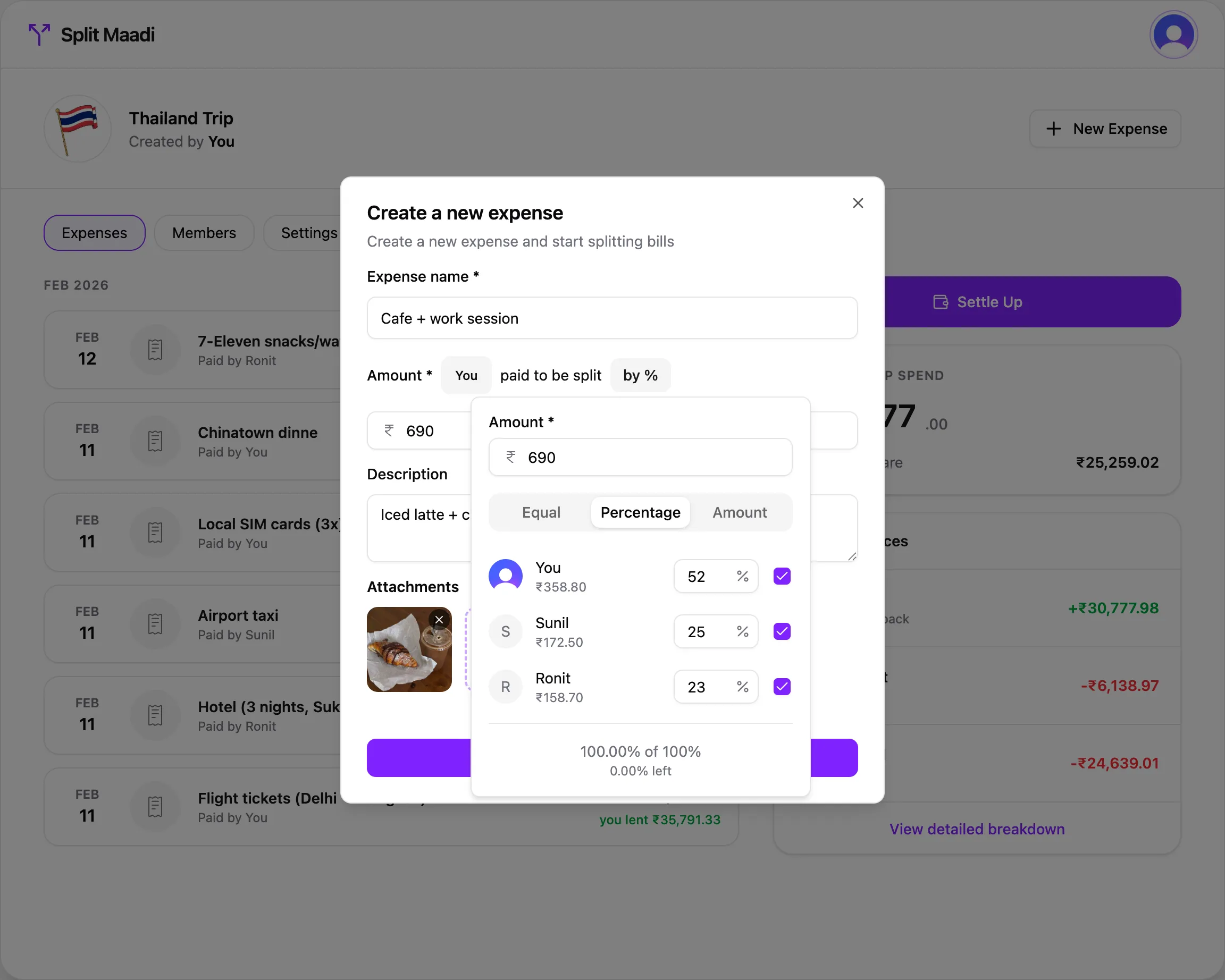
We did a full comparison with Splitwise if you want the detailed breakdown.
Tricount
Tricount is the closest to a like-for-like Splitwise alternative on this list.
What it does: Group expenses where you choose who shares each one and adjust their amounts. Currency conversion: you pick the currency on the receipt and Tricount converts it into the group's main currency. It also lists offline use.
What it costs: Its website says "Free. No ads. No limits." and that there's no daily expense cap.
Platforms: iOS and Android. You can try it without signing up.
Who it's for: Trips with several currencies, where conversion matters, and groups that want a free app with no ads.
Settle Up
Settle Up is made by Step Up Labs and works on Android, iOS and the web.
What it does: Group expenses that are backed up and synced across the group, a suggestion of who pays next that minimizes transactions, all currencies with exchange rates, and offline use that syncs when you're back online. Friends can view a group's balance in the browser from a shared link.
What it costs: Free to use, with ads. A Premium subscription removes ads and adds receipt photos and recurring and future expenses. The US App Store lists Premium from $3.99 a month, plus group and lifetime options.
Who it's for: Groups with mixed currencies, and people who are happy to pay for recurring expenses and receipt photos.
Splid
Splid is clean and focused, and you can use it without an account.
What it does: Offline groups, with optional sync if you want to enter expenses together. More than 150 currencies, with automatic conversion.
What it costs: Its website says "Splid is free!"
Platforms: iOS and Android. No sign-up required.
Who it's for: People who want something simple, especially for one-off trips across currencies.
Google Sheets (seriously)
I know, I know. But for completeness: if you're splitting expenses between two people with predictable bills, a shared spreadsheet actually works. We wrote about when spreadsheets beat apps — the answer is "only when it's simple."
The moment you add a third person or variable expenses, spreadsheets get harder to keep up. But for you and your roommate splitting rent and electricity? A sheet is fine.
The one nobody mentions: just doing it manually
WhatsApp group, someone does the math at the end of the month, everyone UPIs each other. This is how plenty of people handle shared expenses. It works until it doesn't — usually when the amounts get large enough or the group gets big enough that someone loses track.
If your group is 3 people or fewer and the expenses are small, you honestly might not need an app at all. An app becomes worth it when the mental overhead of tracking who owes what starts causing friction.
So which one should you use?
If you want free with no ads, receipt scanning and recurring expenses, and one currency per group is enough: Split Maadi. Bias acknowledged.
If your trip mixes currencies and you want conversion for free: Tricount or Splid.
If you want the most established option and don't mind paying: Splitwise Pro is still good. The free plan's daily limit is the main catch.
If you want a web app and don't mind ads or a subscription for extras: Settle Up.
If you're two people splitting rent: a spreadsheet.
Try the free alternative
No ads, no paid plan, no premium tier. Just expense splitting that works.
Try Split Maadi freeThe best expense splitting app is the one your whole group actually uses. Features don't matter if your friends won't open the app. Pick something free, easy to join, and low-friction — then the hard part is just remembering to log expenses when they happen.
Sources
Checked in October 2026. Prices and features change; check each app before you rely on them.
- Splitwise: What is Splitwise Pro? (free daily limit, Pro features) and Splitwise Pro (ad-free with Pro)
- Tricount: tricount.com (free, no ads, no daily cap, conversion, offline, platforms) and its travel page (converting receipts into the trip's currency)
- Settle Up: settleup.io (sync, minimizing transactions, platforms) and its US App Store listing (ads, Premium features and prices, currencies, offline)
- Splid: splid.app (free, offline groups, 150+ currencies, no sign-up)